PaperGuru Blog
All blog posts →Lab Compute Now Runs on a Fund Balance, with More GPU Choices
Lab Compute now uses a dedicated Fund balance for pay-as-you-go GPU usage, and the resource catalog has expanded from RTX machines to A100, H100, H200, B200, and B300 options for heavier research workloads.
By PaperGuru Team · June 12, 2026

When we introduced Lab Compute last month, the goal was simple: give researchers a GPU machine directly inside the PaperGuru workspace, so experiments, files, terminal output, and writing context could live in the same place.
Today we are shipping the next step for that beta: Lab Compute now runs on a dedicated Lab Compute Fund, and the available machine catalog is significantly larger.
Pay from a Lab Compute Fund
The first version of Lab Compute used prepaid runtime blocks. You selected a machine, bought time for that machine, and renewed when the block was close to running out. That was predictable, but it became awkward as the catalog expanded: time purchased for one GPU type did not naturally translate to another GPU type, and every new machine needed its own checkout flow.
The new model is simpler. You add money to your Lab Compute Fund, start a machine, and the running machine draws from that balance based on its hourly rate and actual runtime. Stop the machine when you are done, and the remaining Fund balance stays available for the next run.
This makes Lab Compute easier to use across different experiment sizes. You can start with an RTX 4090 for quick tests, move to an A100 or H100 for larger training jobs, and use the same Fund balance instead of buying isolated runtime packages each time.
A Larger GPU Catalog
Lab Compute now supports a broader range of machines, from practical single-GPU workstations to high-memory accelerator options:
- RTX 4090 for everyday inference, prototypes, and medium-sized experiments.
- RTX 5090 for faster single-card runs with 32 GB of VRAM.
- A100 40G and A100 80G for larger training and reproduction workloads.
- H100 80G and H200 141G for high-throughput model work and memory-heavy jobs.
- B200 180G and B300 262G for flagship workloads that need substantially more VRAM.
Each resource card shows the current hourly rate, availability, disk size, and supported GPU count. Higher-end cards can also expose multi-GPU options when capacity is available.
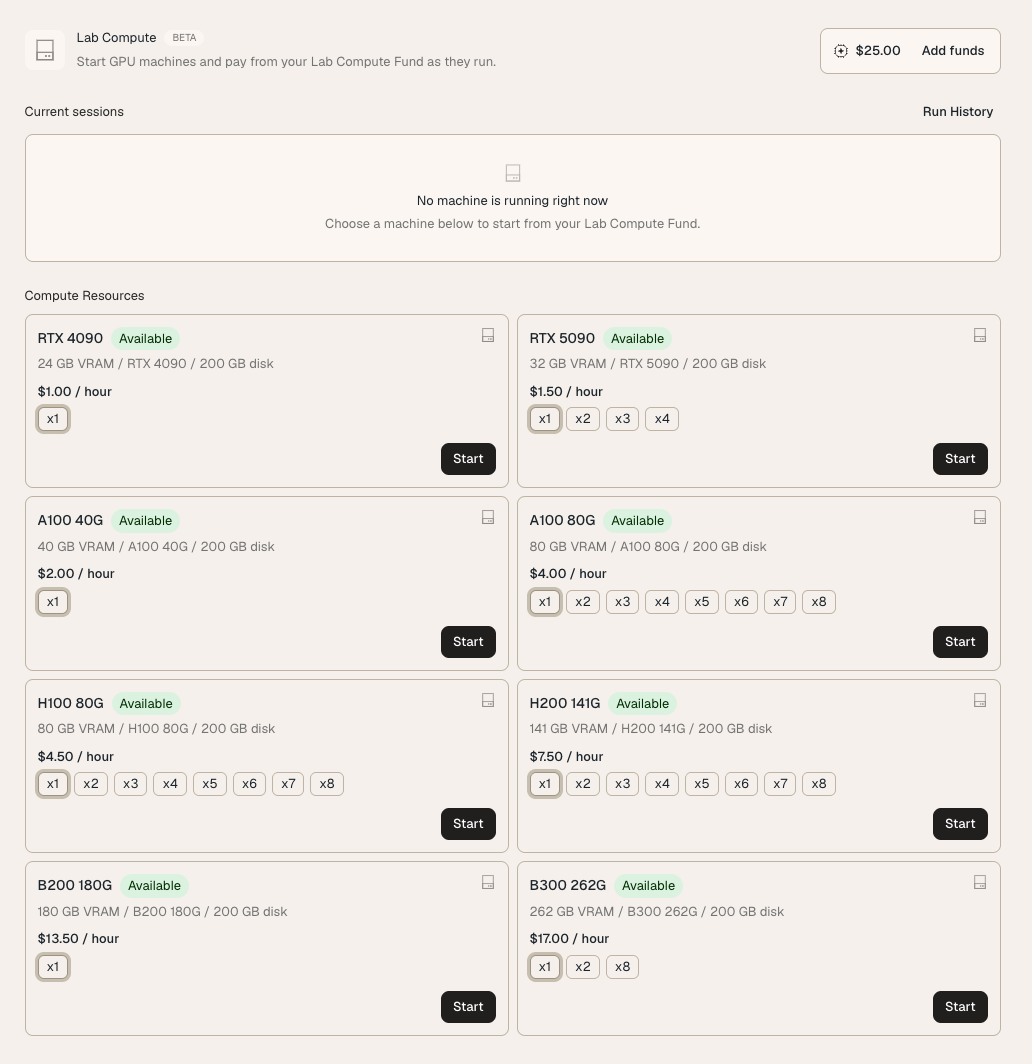
More Transparent Sessions
The Lab Compute page now separates three things more clearly:
- Your current Fund balance and the action to add funds.
- Any active machine session that is currently running.
- A Run History view for completed sessions and usage review.
This should make cost and state easier to reason about. You can see whether anything is running, choose the right resource for the next experiment, and keep track of prior runs without digging through checkout receipts.
What This Enables
The original Lab Compute release focused on closing the loop between experiments and writing. This update makes that loop more flexible. A literature review or paper draft may only need a quick GPU check; a reproduction study may need an A100; a larger model experiment may need H100, H200, or beyond. Those should feel like different choices inside the same workflow, not separate products.
Lab Compute is still in beta, and availability will vary by GPU type as demand changes. We will keep expanding capacity, improving startup reliability, and refining the Fund experience as more researchers run real experiments through the workspace.
You can find the updated resource matrix in the Lab Compute page today. Add funds once, pick the machine that fits the job, and stop it when the run is finished.