PaperGuru Blog
All blog posts →Introducing Compression Levels: Longer Sessions, Less Overhead
PaperGuru now lets you choose how aggressively the agent compresses its working context — Normal, Balanced, or Aggressive — to match your session's needs without sacrificing output quality.
By PaperGuru Team · May 17, 2026

Writing a research paper is not a single prompt. It is a conversation — sometimes spanning hundreds of exchanges across literature review, hypothesis refinement, drafting, and revision. Over that arc, something quietly works against you: every message you send to the agent carries the full weight of every message that came before it.
This is a fundamental property of how modern LLMs work. They are stateless — each response is generated by re-reading the entire conversation from the beginning. A session that starts light and focused gradually accumulates context: search results, compiled LaTeX logs, extracted passages, intermediate reasoning. The longer the session, the heavier that accumulated context becomes.
For many sessions, this is fine — the full context is exactly what the agent needs. But for long paper-writing workflows, the accumulated overhead can become significant, and much of it is content the agent already synthesized several turns ago.
Today, we are shipping Compression Levels — a per-session control that lets you choose how aggressively PaperGuru manages its working context. It is the same agent, doing the same work, with a smarter approach to what it keeps in memory at any given moment. The practical result: long sessions use substantially fewer credits, without any change to what the agent produces.
Why Context Grows So Fast
Every AI agent on a frontier model works the same way under the hood: each generation call receives the full conversation as input. There is no persistent memory between steps — the model sees the transcript, generates the next response, and the transcript grows a little longer.
In a paper-writing session, that transcript fills up quickly. A single literature review turn might trigger the agent to search for papers, extract relevant passages, reconcile conflicting claims, and structure its findings — all as sequential steps, each adding to the running log. By the time you ask about methodology in the next turn, the agent is carrying the complete trace of everything it did before.
What we observed in real sessions was that a meaningful portion of this overhead comes from cache mechanics rather than raw content. The way context caching works at the model-provider level, each step in an agent turn was effectively re-writing a fresh cache entry for the growing conversation prefix — even when the underlying content had not changed. This meant that a ten-step agent turn was paying cache-write costs ten times over, instead of once.
The second factor is compaction timing. PaperGuru already summarizes old context when conversations grow very long, but the default threshold was set conservatively to preserve maximum context. Earlier, more frequent compaction turns out to reduce total overhead substantially on long sessions, with minimal impact on the agent's ability to recall prior work — because the compaction itself produces a coherent summary.
The Three Levels
Compression Levels gives you three settings:
Normal is the default and matches PaperGuru's existing behavior exactly. Nothing changes. The full conversation history is available at every step, and compaction triggers only when the context is nearly full. Use this for short sessions, exploratory work, or any time you want maximum context retention.
Balanced introduces two targeted improvements with no quality tradeoff. First, it anchors the context cache at the boundary of each user message rather than drifting forward with every agent step — this turns multiple redundant cache-writes within a single turn into one. Second, it lowers the compaction threshold so the agent summarizes earlier, keeping the active context leaner. It also adds a standing hint that encourages the agent to call independent tools in parallel rather than sequentially, which often makes responses faster as a side effect. In our internal testing on representative paper-writing workflows, Balanced reduces session overhead — and credit consumption — by roughly 25–35% with no measurable quality difference.
Aggressive builds on Balanced and adds tighter pruning of older tool outputs and a more compact system prompt variant. Old search results and compiled logs are trimmed more aggressively once the agent has synthesized them. In exchange, if the agent needs to revisit a detail from a trimmed result, it may re-run the search — which it will do transparently. Aggressive reduces overhead and credit usage by roughly 45–60% on long sessions. We recommend it for extended multi-hour sessions where you already have a good sense of the workflow.
How to Use It
The control lives in the chat toolbar, immediately to the left of the model selector. Click it to open the level picker — each option shows a one-line description so you can pick the right level without leaving the flow. If you want a fuller side-by-side comparison of what each level gains and trades off, click the Learn more about compression link at the bottom of the dropdown.
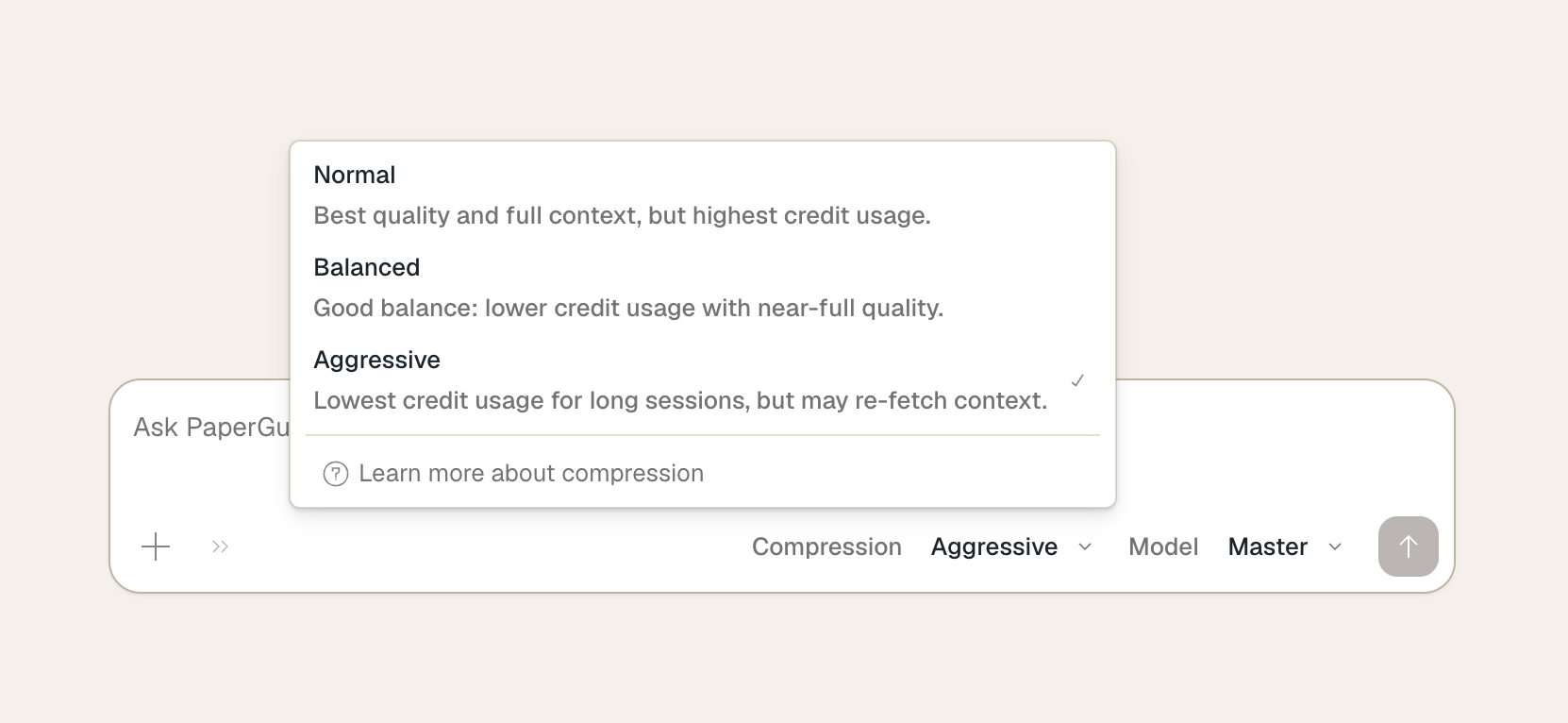
You can switch levels at any point mid-session, and the change takes effect on the next turn.
The setting is per-session. If you start a new session, it defaults back to Normal. There is no project-level default at the moment, though that is something we may add based on how people use this in practice.
What Does Not Change
The agent is the same agent. It reads the same papers, calls the same tools, and applies the same reasoning. Compression Levels control how the system manages the transcript behind the scenes — not what the agent does or what it produces.
Balanced makes no behavioral changes to the agent at all; it only changes when and how context is cached and compacted. Aggressive adds tool result trimming and a leaner system prompt, which can very occasionally mean the agent re-fetches something — but it does so transparently, without degrading the final output.
A Note on Long Sessions
Paper writing sessions can easily run to a hundred or more agent steps over several hours. That is precisely the workflow PaperGuru is built for, and it is also where accumulated context overhead is most visible. Compression Levels are designed for this case.
If you have a session where you are making rapid iterative edits across a long document, pushing through multiple literature search rounds, or running back-to-back LaTeX compilations, Balanced or Aggressive will make those sessions noticeably more efficient. For a quick ten-minute session, the difference is small — Normal is perfectly appropriate.
Compression Levels are available to all PaperGuru users starting today. Switch levels from the toolbar during any session, and let us know what you think — we will be watching session patterns closely and refining the profiles based on real-world usage.
Happy researching.